Case Study · Great Learning
GL Shine: rebuilding the CRM that runs Great Learning's sales floor.
A from-scratch sales CRM that gave learning consultants their day back, doubled call connectivity, and lifted program-explanation calls by 40%.

- Role
- Senior UX Designer
- Team
- 1 PM · 3 Engineers
- My work
- Research · Prototyping · Testing
- Timeline
- 3 months
Impact
Connectivity
~40 → ~80
Connected calls per LC, per day.
Sales Application
+20%
Applications assisted by sales.
PDE calls
+40%
Program-detail calls, ~20 → ~28 a day.
The stakes
Great Learning sells high-ticket programs, ₹1.5 lakh and up. Those deals don't close themselves. A sales team of Learning Consultants (LCs) works every interested lead: explaining the program, walking people through the decision, helping them enroll. Picture a car salesperson, except at volume, calling lead after lead all day.
The CRM is where they live. Every call, every note, every follow-up runs through it. The company had been renting that workflow from a third-party CRM and decided to build its own. The reasons stacked up:
- Cut tooling cost (the third-party CRM carried a seven-figure annual price tag)
- Own the capability and the tracking
- Consolidate the workflow in-house
- Add functionality the off-the-shelf tool couldn't
I owned the experience design for the replacement, GL Shine.
The brief, and the reframe
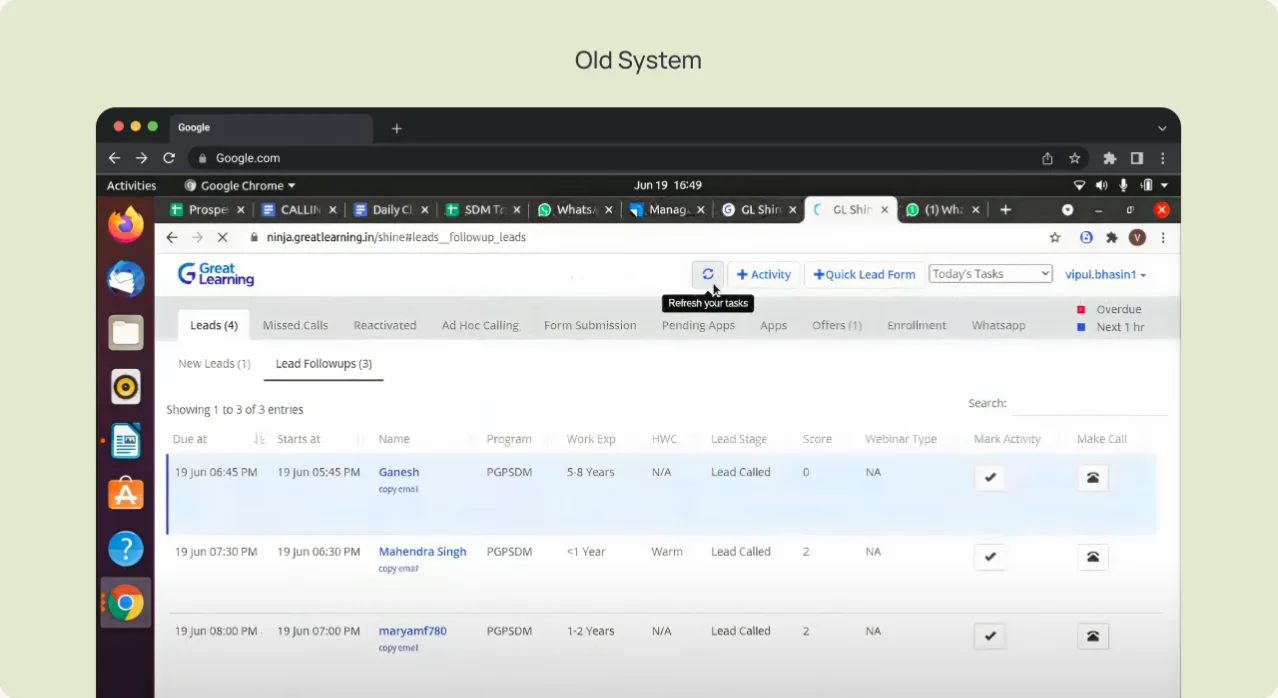
The easy version of this brief was "rebuild the old CRM, but ours." I reframed it around the person who actually lives in the tool:
"Understand the LC's calling task, then intervene so they spend less time on it and fight less complexity getting it done."
Two targets defined success:
- Lift average team compliance from 40% to 60%
- Add 20 calls per day, absolute (off a baseline of ~100)
The real problem: three people, three conflicting goals
Before touching a screen, I mapped who the system actually serves. Three stakeholders, and their goals pull in different directions:
The LC
wants maximum incentive for minimum effort.
The Team Lead
wants leads distributed for the highest team output: good leads to top closers, cold leads to average ones, and the team coached up.
The Business Head
wants every LC performing like the best one: higher compliance, more calls.
Optimize for any one of them and you fail the other two. The central design problem wasn't a screen. It was aligning three incentive structures inside one workflow.
Research: where the day actually goes
I interviewed and shadowed LCs to see the real shape of the work, then ran a task analysis of the existing system. It broke into four flows:
CNC (Could Not Connect)
60%
CBL (connected, Call Back Later)
20%
Connected and interested
10%
Connected, not interested / not eligible
~10%
Most of an LC's day went to calls that never connected, plus the manual busywork wrapped around them. That one finding reframed the whole project. Here's what was actually eating the time:
- Marking activity and firing off CNC emails and WhatsApp messages after a failed call
- Switching tabs mid-call to answer questions or dig up information
- Note-taking that was awkward to do while talking
- Calls that connected badly even when they did go through, which just frustrated everyone
- And before any of that, deciding whom to call. Every LC did it their own ad-hoc way.
Design principles
Research pointed at three:
- 1.
Keep what's familiar. Stay close to the old tool's mental model so the learning curve stays low. This team churns, and new LCs need to get productive fast.
- 2.
Let the system decide whom to call. Take the “who's next” decision off the LC's plate so they can just call. That maps straight to the calls-per-day target.
- 3.
Make the work visible to leads and heads. Surface tracking so team leads and business heads can analyze and optimize performance.
Underneath all three: strip out the busywork around failed calls and the overhead of deciding whom to call next. That's where the day was leaking.
The solution: ideate first, constrain later
I started with a rough wireframe and deliberately ignored the system limitations. Get the direction right first, then let reality narrow it. The concept was one home screen that pulls the LC's whole day into a single view, so they stop assembling context across tabs:
- A time-blocked task queue (Quarter 1 / 2 / 3) that gives the day structure and lets the system feed the next batch of leads
- A recommendation engine that surfaces whom to call, taking the per-LC guesswork off the table
- Personal metrics (task completion, talk time, inbound/outbound calls, learners enrolled) so an LC can see their own progress
- A team leaderboard to rebuild the sense of achievement the old setup lacked
Then the constraints hit
The systems the ideal concept leaned on weren't built yet:
- Third-party calling integration was still in testing
- Automatic CNC marking wasn't possible yet
- WhatsApp messaging came with a delay
I couldn't assume the automation the wireframe quietly depended on.
The revised UI
So I reworked the concept around what engineering could actually ship. Instead of pretending the manual path was gone, I made it fast: quick activity marking, with the CNC email and WhatsApp steps pulled into the flow rather than scattered across tabs. The recommendation engine stayed, since taking the "whom to call" decision off the LC was the whole point. This revised UI is what went into testing.
Best viewed on desktop
Switch to a larger screen to try this prototype.
Three rollouts, three different lessons
Each stage put the design in front of a different group, and each surfaced something the one before it couldn't.
- 01
Pilot, 5 LCs.
I tested the revised flow with five LCs, gathered their feedback, and made changes off it.
- 02
Control set, production-ready.
The updated build went to a controlled set, now production-ready, to measure real movement in the metrics. This is where the genuine pain point showed up. The veteran LCs didn't trust a system telling them whom to call. They'd worked the old way the longest, the change felt abrupt, and the recommendation asked them to hand over a judgment they'd always owned.
- 03
Wider rollout.
This forced me off my original bet. Principle two had been let the system decide whom to call, and for new and average LCs that worked fine. But the system was effectively run by the high-performing veterans, the people bringing in most of the enrollments, and dictating their calls put their numbers, and the company's, at risk. So I traded automation for structure: leads were grouped into clearly defined buckets, with every LC keeping the discretion to decide whom to call from them. That version shipped to the larger audience, and the impact below is from it.
Impact
- ~40 → ~80 — Connected calls per LC per day, roughly doubled.
- +40% — Program-detail (PDE) calls, ~20 → ~28 a day.
- +20% — Sales Application: applications assisted by sales.
Satisfaction (post-launch survey, 532 LCs invited, ~76% response rate)
~78%
Domestic: rated Shine v3 as good as or better than the old version (28.38% “much better,” 50.00% “better but improvable”)
~84%
International: said the same (40.98% “much better,” 42.62% “better but improvable”)
What LCs kept calling out: everything in one place (tasks, leads, metrics), more visibility through reports and shift timings, and a better UI overall.
"I am thrilled to use the new GL Shine… it has made my job easy. Overall I feel my connectivity has improved."
What I'd do differently, and what I'd keep
- Test the risky logic early, not just the flow. In the pilot I tested the interface and the flow, but not the recommendation engine itself, since it was logic-based rather than something you click through. That logic was exactly what the veteran LCs rejected.
- Design for conflicting incentives. The interface was the easy part. The real work was making one workflow serve an LC, a team lead, and a business head at the same time.
- Design the manual path well. With automation still in testing, the win came from making the realistic, hands-on flow fast, not from designing for a future that hadn't shipped.
More where this came from.